One Projector, Every Room: Adapting Sanyo LCD Performance Across Five Real-World Lighting Environments
A projector that looks stunning in a darkened demo room can appear washed out, dull, or inaccurate the moment it is installed in an actual workspace or living area. Ambient light—the light you did not plan for—is responsible for more viewer disappointment than any hardware limitation. The good news is that modern Sanyo LCD projectors include a range of adjustable settings designed specifically to address this challenge, and understanding how to deploy them can transform the experience in virtually any room.
Below are five common real-world environments, the lighting conditions they present, and the configuration strategies that deliver the clearest, most accurate image in each.
1. The Sunlit Conference Room
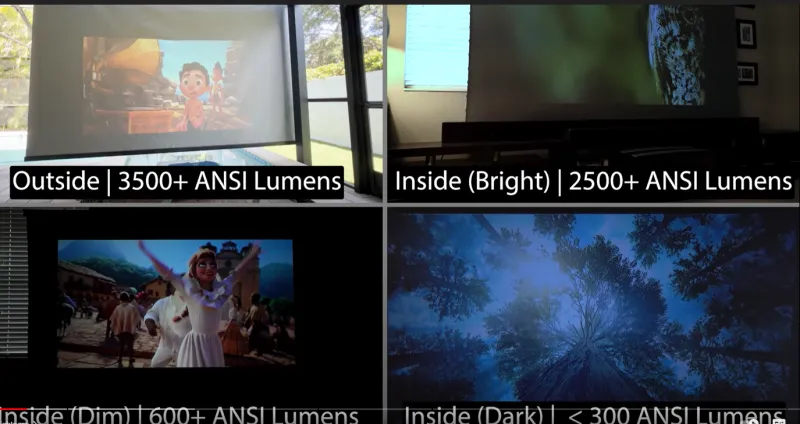
Few environments are harder on a projector than a corporate conference room during a midday meeting. Floor-to-ceiling windows, overhead fluorescent or LED panels, and reflective surfaces combine to create ambient light levels that can exceed 500 lux—enough to make a low-brightness projector functionally invisible.
In this environment, brightness is the primary priority. Set the projector to its highest output mode and select a color preset oriented toward presentation use rather than cinema—typically labeled "Dynamic" or "Presentation" in Sanyo's menu system. These presets favor elevated white luminance and higher color temperature, which improves text legibility and chart clarity against a bright background.
If the room permits any light management, even partial—closing one bank of blinds or dimming overhead fixtures directly above the screen—do so. A modest reduction in ambient light can increase perceived contrast significantly without requiring any changes to the projector itself. When window treatment is not an option, a high-gain screen surface can partially compensate by directing more reflected light toward the audience.
For installations where the room configuration is fixed, Sanyo's higher-lumen commercial models are engineered with this use case in mind. Pairing the appropriate hardware with the correct picture mode is the most reliable path to a readable image.
2. The Partially Darkened Boardroom
Many executive conference rooms occupy interior spaces or include motorized shading, allowing for controlled dimming during presentations. This middle-ground environment—neither fully lit nor fully dark—is where image quality most directly reflects calibration quality.
With ambient light reduced to roughly 50 to 150 lux, shift the color mode to a more balanced preset such as "Standard" or "sRGB." This reduces the aggressive brightness push of the Dynamic mode and allows the projector's color accuracy to come forward. Skin tones in video content become more natural, and data visualizations gain the color differentiation that helps audiences interpret information quickly.
This is also the environment in which contrast ratio matters most. With moderate ambient light, the eye can perceive gradations between dark and medium tones, and a projector with strong native contrast will render shadow detail and on-screen depth that a low-contrast unit simply cannot replicate. Sanyo's LCD architecture, which maintains consistent light path geometry, supports stable contrast performance across extended presentations without the color wheel artifacts associated with single-chip DLP alternatives.
Adjust keystone correction carefully in this setting. Even slight geometric distortion is more visible to a critical audience in a professional environment, and digital keystone correction applied aggressively can soften fine text. Where possible, physical lens adjustment or projector positioning is preferable to heavy digital correction.
3. The Living Room with Mixed Natural and Artificial Light
The American living room presents a uniquely variable challenge. Evening use with lamps on, afternoon use with sunlight filtering through sheer curtains, and weekend daytime viewing all impose different ambient conditions on the same installed projector.
For households that use their projector across these varying conditions, the most practical approach is to create and save multiple picture mode configurations. Sanyo projectors allow users to store custom settings, enabling a quick toggle between a brighter daytime profile and a calibrated evening profile without navigating through full menu adjustments each time.
For the evening profile, reduce brightness slightly from maximum, lower color temperature toward the 6500K range for warmer, more cinematic rendering, and engage any available gamma adjustment to lift shadow detail. For the daytime profile, increase brightness and shift color temperature higher to maintain image visibility against competing natural light.
Screen placement also plays a meaningful role. Positioning the screen on a wall perpendicular to windows rather than opposite them reduces the direct ambient light striking the projection surface, improving perceived contrast without any hardware or settings change.
4. The Dedicated Home Theater
A light-controlled home theater—blackout curtains, dark wall treatments, no competing light sources during use—represents the environment in which an LCD projector can deliver its most refined performance. This is also the setting where incorrect configuration is most noticeable, because the eye adapts to darkness and becomes sensitive to color inaccuracies that would be invisible in a brighter room.
In a fully darkened space, reduce projector brightness from its maximum setting. Running at peak output in a dark room produces an image that is uncomfortably bright and often oversaturated. A calibrated "Cinema" or "Movie" preset, combined with a brightness reduction to roughly 60 to 70 percent of maximum, creates a more natural viewing experience.
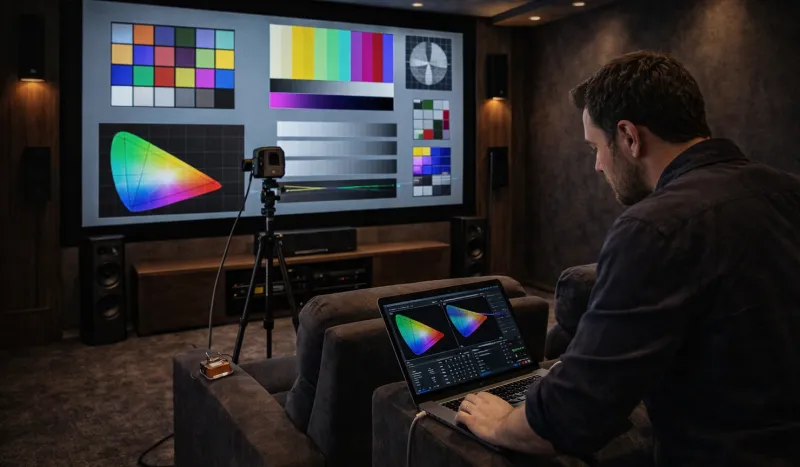
This is also the appropriate environment for color calibration using a hardware colorimeter and calibration software such as CalMAN or HCFR. Sanyo's LCD projectors support color management adjustments that allow users—or professional calibrators—to align the display to established standards such as Rec. 709 for HD content or DCI-P3 for compatible 4K sources. For serious home theater users, a calibrated image in a controlled environment represents the full realization of what the hardware can deliver.
Lamp mode in this context can be set to eco, reducing brightness and extending lamp life simultaneously. In a dark room, the resulting output remains more than sufficient, and the operational savings over a multi-year installation period are meaningful.
5. Game Night and Casual Multipurpose Use
Not every projection session is a formal presentation or a curated film screening. Game nights, sports viewing, and casual social gatherings involve ambient light levels that change as people move around the room, lamps are switched on and off, and attention shifts between the screen and the space around it.
For this use case, flexibility matters more than precision. A mid-range brightness setting with a "Game" or "Vivid" color preset delivers the punchy, high-contrast image that suits fast-moving content and engages viewers who are not seated in an optimal position. Response time is also relevant for gaming applications; Sanyo's LCD projectors support input lag configurations that reduce processing delay for connected game consoles.
In a social setting, the projector's ability to maintain consistent color across a wide horizontal viewing angle becomes relevant. LCD technology's inherent uniformity across the screen surface ensures that viewers seated off-axis see an image consistent with those seated directly in front—a practical advantage when a group is spread across a room.
Bringing It Together
The defining characteristic of a well-chosen projector is not peak performance under ideal conditions—it is consistent, adaptable performance across the conditions that actually exist in your space. Sanyo LCD projectors are designed with that adaptability in mind, offering the configuration depth to serve a boardroom presentation at noon and a home theater screening at midnight with equal competence. The settings are there. Using them deliberately is what separates a satisfactory installation from an exceptional one.