Moisture's Quiet Assault: What Humidity Cycles Do to Your LCD Projector's Polarizing Filters
There is a particular kind of frustration that comes with watching your projector's image quality decline without any obvious explanation. The lamp hours are reasonable. The filters have been cleaned. The lens is spotless. Yet colors appear washed out, contrast seems muted, and certain portions of the image carry a faint yellowish or brownish cast that was never there before. In many cases — particularly among users in coastal states, the Gulf South, and the Pacific Northwest — the damage has been accumulating inside the optical engine for months, driven not by dust or age but by something far less visible: moisture.
Understanding how humidity interacts with LCD polarizer technology is not a niche concern for engineers. It is practical knowledge that directly affects how long your Sanyo LCD projector maintains the image quality you paid for.
What Polarizers Actually Do — and Why They're Vulnerable
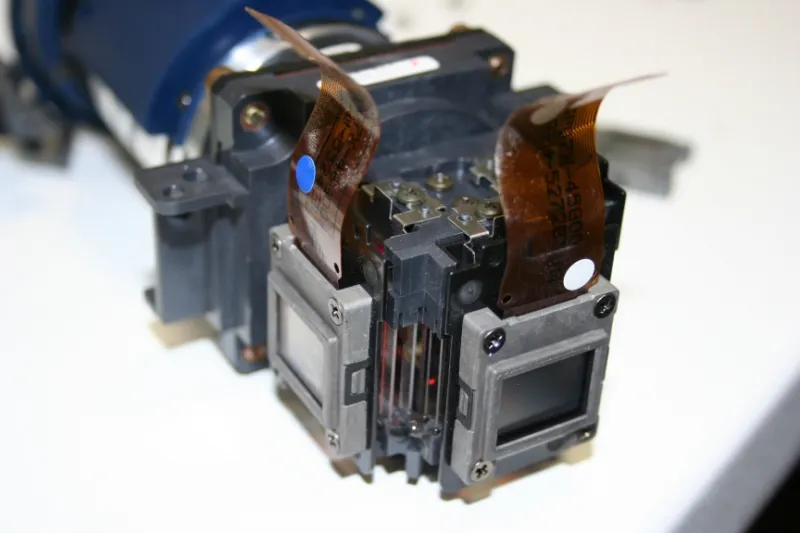
Every LCD projector contains polarizing filters positioned on either side of each liquid crystal panel. Their function is precise and non-negotiable: they control the orientation of light passing through the system, enabling the liquid crystal layer to modulate brightness and color with accuracy. Without properly functioning polarizers, the projector cannot render deep blacks, maintain accurate color separation, or produce the contrast ratios listed in its specifications.
Polarizers in projection-grade optics are constructed from layers of polyvinyl alcohol (PVA) film, iodine-based dye compounds, and protective cellulose acetate substrates. This layered construction is what makes them effective — and what makes them susceptible to moisture. The PVA film is hygroscopic, meaning it absorbs water vapor from the surrounding environment. Under normal operating conditions, the projector's internal heat keeps moisture at bay. The problem arises during off-cycles, when the unit cools and the relative humidity inside the chassis rises.
The Cycle That Does the Damage
The mechanism is straightforward but insidious. When a projector is running, internal temperatures can reach 140°F or higher in the optical block area. Moisture cannot accumulate under those conditions. But when the unit is powered down — particularly in a humid room — the temperature drops rapidly. Warm, moisture-laden air that entered through ventilation ports during operation is now cooling, and as it cools, its capacity to hold water vapor decreases. The result is condensation forming on internal surfaces, including the optical filters.
This would be manageable if it happened once. The real damage comes from repetition. Each power cycle — on, off, on, off — subjects the polarizer layers to thermal and moisture stress. The PVA film expands slightly as it absorbs moisture, then contracts as the projector heats up and that moisture evaporates. Over dozens, then hundreds of cycles, this expansion and contraction causes micro-delamination between the filter layers. The iodine dye compounds, which are responsible for the filter's polarizing efficiency, begin to migrate and degrade. The result is a filter that no longer blocks light uniformly — producing the color shifts, hot spots, and contrast loss that owners mistakenly attribute to lamp aging.
Which US Climates Pose the Greatest Risk
Not all projector environments carry equal risk. Understanding your regional exposure is the first step toward meaningful prevention.
High-Risk Regions: The Gulf Coast states — Louisiana, Mississippi, Alabama, and coastal Texas and Florida — represent the most aggressive humidity environments in the continental United States. Average relative humidity in cities like New Orleans, Houston, and Miami regularly exceeds 75 percent year-round, with summer months pushing into the 85–90 percent range. Projectors in these environments, particularly those stored in unconditioned spaces or rooms that are not consistently climate-controlled, face accelerated polarizer degradation.
The Southeast Atlantic coast from Georgia through the Carolinas and into Virginia presents similar conditions during the April through October humidity season. Coastal California — despite its reputation for mild weather — delivers persistent marine layer humidity in cities like San Francisco, Monterey, and the greater Los Angeles basin, particularly in rooms that face the ocean or receive coastal air through open windows.
The Pacific Northwest, including Seattle, Portland, and coastal Oregon, combines high annual humidity with significant temperature variation, making the on-off thermal cycling particularly damaging. Projectors in these areas that are used seasonally — home theater setups that sit dormant for weeks at a time — are especially vulnerable.
Moderate-Risk Regions: The Midwest and Great Plains states experience pronounced seasonal humidity swings. Summer humidity in Chicago, Kansas City, and Minneapolis can rival Gulf Coast levels, while winters are comparatively dry. This seasonal cycling creates a different but still meaningful stress pattern for projector polarizers.
Lower-Risk Regions: The Mountain West and desert Southwest — Arizona, Nevada, Utah, and inland California — generally present the least hostile humidity environments. Projectors in Phoenix, Las Vegas, or Salt Lake City face far less moisture-related stress, though other factors such as dust infiltration remain relevant.
Why the Damage Often Goes Unnoticed Until It's Severe
Polarizer degradation is a gradual process. Unlike a lamp failure, which is sudden and unmistakable, filter deterioration progresses in increments too small to register in any given session. Owners adapt to the slowly shifting image without realizing they are recalibrating their expectations downward. By the time the discoloration or contrast loss is obvious enough to prompt investigation, the polarizer may already be beyond the point where cleaning or adjustment will restore performance. Replacement of the optical filters — a procedure that requires disassembly of the optical block — is the only remedy at that stage, and it is neither inexpensive nor straightforward.
Prevention Strategies Most Owners Never Consider
The encouraging reality is that polarizer degradation from humidity is largely preventable with consistent, low-effort practices.
Store with silica gel desiccant. When the projector is not in regular use, storing it in a sealed case or cabinet with fresh silica gel packets dramatically reduces the moisture available to infiltrate the chassis during off-cycles. This is especially relevant for seasonal users or those in high-humidity regions.
Use a cooling timer and allow full cool-down before storage. Many Sanyo LCD projectors include a cooling fan cycle that runs after shutdown. Allowing this cycle to complete fully — rather than cutting power at the wall immediately — ensures that residual heat has dissipated moisture from the optical cavity before the unit cools to ambient temperature.
Maintain consistent room climate. A room that holds a stable temperature and humidity level — ideally between 40 and 60 percent relative humidity — subjects the projector to far less thermal and moisture cycling than a space that fluctuates dramatically between day and night or season to season. A modestly priced room dehumidifier can be a meaningful investment in projector longevity for users in the Gulf South or Pacific Northwest.
Avoid cold storage environments. Moving a projector from an air-conditioned room to a hot, humid garage or attic for storage is a particularly damaging practice. The sudden temperature differential accelerates condensation formation on internal components.
Inspect periodically for early warning signs. A slight yellowish tint concentrated in one panel's color channel, uneven brightness across the image field, or a soft-edged discoloration in a corner of the frame are all early indicators of polarizer stress. Catching these signs early and addressing the storage and operating environment can slow or halt further deterioration.
The Investment Perspective
Sanyo LCD projectors represent a meaningful financial commitment, whether deployed in a corporate boardroom or a dedicated home theater. The lamp, the lens, and the LCD panels themselves tend to receive the most attention in maintenance discussions. But the polarizing filters that make precise, accurate imagery possible are equally critical — and considerably more sensitive to environmental conditions than most owners realize.
In humid US climates, treating humidity management as a routine part of projector ownership is not excessive caution. It is the difference between a system that maintains its original image quality for years and one that quietly deteriorates until the cost of restoration exceeds the value of the investment.