Color Fringe and the Slow Fade: Understanding LCD Projector Convergence Drift Before It Costs You
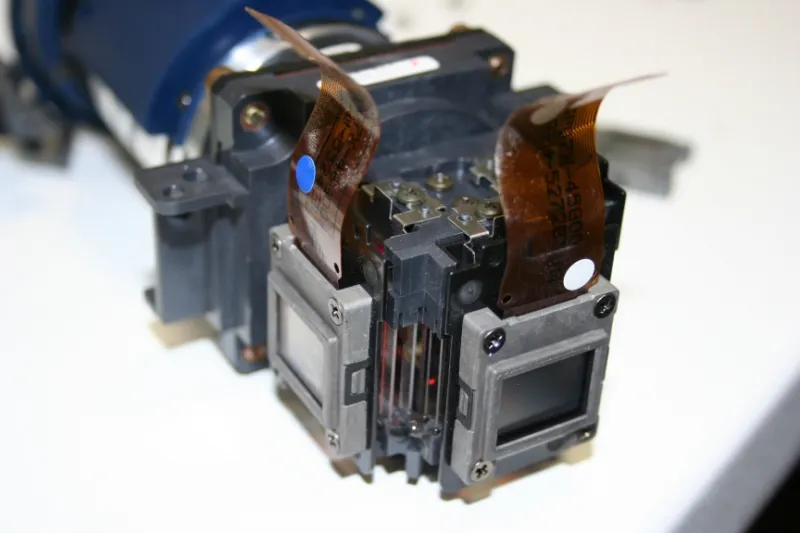
Photo: LCD projector internal optical prism maintenance technician close up, via www.tas-help.co.uk
There is a particular frustration unique to long-term projector ownership: the gradual, almost imperceptible decline in image quality that accumulates over months of use until one day a viewer notices that white text on a dark background appears to have a faint colored shadow. The image still functions. Colors still appear broadly correct. But something is clearly wrong, and it was not wrong six months ago.
What that viewer is observing is convergence drift — the incremental misalignment of the three LCD panels responsible for projecting red, green, and blue light. It is one of the most common long-term maintenance concerns in LCD projection technology, and it is one of the least discussed in product documentation. Understanding the mechanics behind it, recognizing its early symptoms, and knowing how to respond are essential skills for anyone who expects serious performance from their projector over a multi-year ownership period.
The Physics of Three-Panel LCD Projection
Unlike single-chip DLP projectors, LCD projectors split incoming white light into three separate color channels using a dichroic prism assembly. Each channel passes through its own dedicated liquid crystal panel — one for red, one for green, one for blue — before the three beams are recombined by a second prism and directed through the projection lens.
For the final image to appear sharp and color-accurate, the three panels must be in precise physical alignment. When they are perfectly registered, a white pixel on screen is formed by red, green, and blue subpixels that land in exactly the same location. When alignment drifts, those subpixels diverge slightly, producing what appears as a colored fringe or "halo" around fine detail — particularly visible on high-contrast edges such as text, architectural lines in presentations, or the boundary between a bright object and a dark background.
The precision required for proper convergence is measured in fractions of a millimeter. The forces working against that precision, however, operate every time the projector is used.
What Causes Convergence to Drift
Two primary mechanisms drive convergence degradation in LCD projectors: thermal expansion and mechanical fatigue.
Every operating cycle subjects the internal components to a temperature swing. When the lamp ignites, internal temperatures rise rapidly — in some configurations, the prism assembly and panel mounting hardware can experience temperature differentials of 30 to 50 degrees Fahrenheit within the first several minutes of operation. As the projector cools after shutdown, those components contract. Over hundreds of operating cycles, this repeated expansion and contraction gradually shifts the physical position of the LCD panels relative to the prism.
Mechanical fatigue compounds the effect. The adhesives, mounting brackets, and micro-adjustment mechanisms that hold the panels in position are engineered to maintain alignment under normal operating conditions, but they are not immune to the cumulative stress of thermal cycling. In projectors that are transported frequently — a common scenario for business users who move units between conference rooms or off-site presentations — vibration and physical handling accelerate the process.
The result is convergence error that accumulates slowly enough to escape notice until it has become genuinely problematic.
Recognizing Early-Stage Convergence Problems
Because convergence drift is gradual, many users adapt to the deteriorating image without consciously registering what has changed. There are specific tests that make early misalignment visible before it reaches a stage where image quality is seriously compromised.
The white-on-black text test is the most reliable method. Project a slide or document with small white text against a pure black background. At proper convergence, the text should appear clean and sharp with no colored fringe. A faint red, green, cyan, or magenta outline — even one that requires close inspection to detect — indicates measurable misalignment.
The crosshatch pattern test provides a more systematic evaluation. Many Sanyo LCD projectors include a built-in test pattern accessible through the service or setup menu. A grid of fine white lines on a black background makes convergence error immediately apparent, as misaligned panels will cause the lines to appear doubled or fringed at their edges.
The fine detail degradation test applies specifically to business users. Project a spreadsheet or technical diagram with fine lines and small numbers. Convergence error that is barely visible on photographic content becomes obvious on this type of material, where precision matters and the eye expects sharp definition.
If any of these tests reveal fringing or doubling, the degree of misalignment will determine the appropriate response.
Preventive Practices That Slow the Process
While convergence drift cannot be entirely prevented, several operational practices meaningfully slow its progression.
Consistent warm-up and cool-down discipline is the most impactful single habit. Allowing the projector to complete its full cooling cycle before powering off — rather than cutting power immediately after use — reduces the severity of the thermal shock that occurs during shutdown. Most Sanyo LCD projectors run their cooling fans for a period after lamp-off; this cycle should always be allowed to complete.
Stable installation positioning reduces mechanical stress. A projector that remains ceiling-mounted in a fixed position experiences far less convergence drift than one that is regularly repositioned, transported in a bag, or placed on unstable surfaces. For business users who require portability, investing in a purpose-built carry case with adequate padding is a meaningful protective measure.
Operating within rated temperature ranges matters more than many users realize. Projectors operated in unusually warm rooms — or positioned near heating vents, in direct sunlight, or in poorly ventilated equipment racks — experience accelerated thermal stress. Sanyo's documentation specifies operating temperature ranges; staying within those parameters preserves both convergence alignment and lamp life.
Avoiding abrupt power interruptions protects the optical assembly. Power outages and hard shutdowns that bypass the cooling cycle create sudden thermal contractions that are disproportionately damaging relative to normal shutdown procedures.
When Software Correction Is and Is Not Sufficient
Many current LCD projectors, including several Sanyo models, offer digital convergence correction through the setup menu. This feature allows users to shift the red and blue panels digitally to compensate for physical misalignment of the optical assembly.
Digital convergence correction is a legitimate tool for addressing minor drift — typically misalignment of one to two pixels. It works by electronically shifting the signal sent to each color channel, which realigns the projected output without any physical adjustment. For business users who notice early-stage fringing, this is often the appropriate first response.
However, digital correction has meaningful limitations. It cannot fully compensate for severe misalignment, and it operates by discarding edge pixels from the shifted channels, which introduces a slight resolution penalty. Additionally, digital correction addresses the symptom — visible misalignment — without addressing the underlying physical drift, which will continue to progress.
For projectors showing significant convergence error — fringing that is visible at normal viewing distances, or misalignment that exceeds the range of digital correction — physical realignment by a qualified service technician is the appropriate remedy. This process involves accessing the optical assembly and making micro-adjustments to the panel positioning hardware, a procedure that requires specialized tools and training.
Knowing When to Seek Professional Service
The decision point for professional intervention is not always obvious. As a practical guideline: if digital convergence correction brings the image to an acceptable state and the rate of drift is slow, continued monitoring with periodic recalibration is reasonable. If the misalignment is progressing rapidly, if digital correction cannot bring the image within acceptable parameters, or if the fringing is accompanied by other symptoms such as color banding or loss of brightness uniformity, professional service should be scheduled promptly.
For Sanyo projectors still within warranty, convergence issues that arise from normal use rather than physical damage are typically covered. For out-of-warranty units, the cost of professional realignment should be weighed against the projector's remaining service life and replacement cost — a calculation that generally favors repair for premium models with substantial lamp hours remaining.
The broader lesson is straightforward: convergence drift is a maintenance issue, not a product defect. Projectors that receive attentive care, consistent operation practices, and timely professional service when warranted will maintain their image precision far longer than those that are used without regard for the physics working against them.
