Too Much of a Good Thing: Why Chasing Maximum Lumens Can Undermine Your Projection Quality
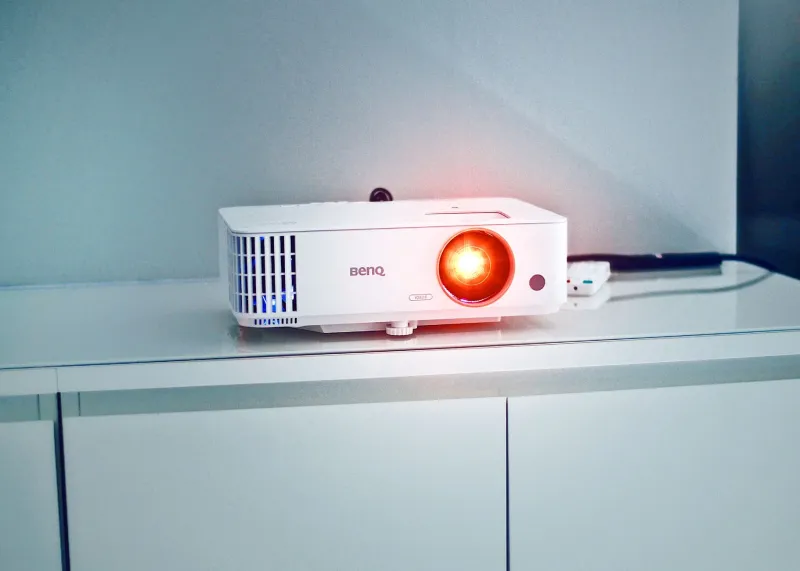
There is a persistent belief in the projector market that more lumens equal a better picture. It is an intuitive assumption — brightness feels like capability, and capability feels like value. Manufacturers reinforce this logic by prominently featuring lumen ratings on product pages, and retailers rarely discourage a customer from buying up. The result is a significant number of home theater owners and boardroom administrators operating projectors at output levels that are actively working against them.
In controlled environments — darkened home theaters, conference rooms with blackout shades, dedicated screening spaces — excessive lumen output does not improve the image. It compromises it. Understanding why requires a closer look at how human vision processes projected light, and what happens to color and contrast when that light exceeds what the environment actually demands.
How the Eye Perceives Projected Images
Human vision does not evaluate brightness in absolute terms. It evaluates brightness relationally — specifically, as the ratio between the darkest and brightest elements within the same scene. This relationship is what we call perceived contrast, and it is the single most important factor in how sharp, dimensional, and lifelike a projected image appears to the human eye.
When a projector operates at appropriate brightness for a given room, the darkest shadows in the image register as genuinely dark because the eye has not been overwhelmed by ambient luminance. The highlights feel bright because the visual system has a meaningful reference point for comparison. The full tonal range of the content — from deep black to peak white — maps cleanly onto the viewer's perceptual range.
Introduce excessive brightness into that same darkened room, and the entire equation shifts. The eye's iris contracts to compensate for the increased luminance, effectively compressing the visible tonal range. Shadows that should appear dark are now lifted into the midtones. Colors that should appear saturated are washed toward white. The image looks bright, but it no longer looks good.
The Color Saturation Problem
Color accuracy in LCD projection depends on a precise balance between the light output of the projector and the absorptive properties of the projection surface. Every color in the image is produced by filtering white light through the projector's LCD panels, and the richness of that color — its saturation — depends on the contrast between the colored light and the surrounding field.
When overall brightness is too high for the room, the white point of the image rises disproportionately. Red, green, and blue primaries, which are already competing with the elevated white field, begin to appear diluted. Skin tones flatten. Deep blues lose their depth. Greens that should look lush instead appear pale. The projector is technically producing accurate color data, but the perceptual experience of that color has been undermined by the sheer volume of light flooding the room.
This is not a calibration problem that can be corrected through the color management settings on the projector alone. It is a fundamental mismatch between output and environment.
Noise as an Unintended Consequence
There is a secondary cost to running a projector at unnecessarily high brightness that most buyers never anticipate: thermal load. LCD projectors generate heat in direct proportion to their light output, and managing that heat requires active cooling — fans, airflow channels, and in some models, variable-speed blower systems that ramp up under sustained high-output conditions.
A projector running at 80 or 90 percent of its maximum lumen output in a dark room will operate its cooling system at correspondingly high intensity. In a quiet home theater environment, that fan noise becomes a meaningful distraction. Dialogue scenes, quiet musical passages, and atmospheric sound design all compete with the ambient hiss and whir of a projector working harder than the room requires.
Reducing brightness output to match the actual environmental need — a straightforward adjustment in most Sanyo LCD models — allows the cooling system to throttle back, extending lamp life, reducing acoustic intrusion, and lowering the thermal stress on internal components simultaneously.
Calculating Your Actual Lumen Requirement
The projector industry uses a metric called foot-lamberts (fL) to describe the brightness of the image as perceived at the screen surface. The Society of Motion Picture and Television Engineers (SMPTE) recommends 16 fL as the reference brightness for a properly calibrated home theater. THX, whose standards are widely respected in the home entertainment community, targets a similar range. Commercial cinema typically operates between 12 and 22 fL depending on screen size and content type.
To estimate the lumen output you actually need, the relevant variables are screen area, screen gain, and ambient light level.
Step one: determine your screen area. Multiply the width of your projection surface by its height, measured in feet. A 100-inch diagonal 16:9 screen, for example, measures approximately 87 inches wide by 49 inches tall — or roughly 29.5 square feet.
Step two: account for screen gain. Gain refers to how reflective your screen surface is relative to a neutral white reference. A 1.0 gain screen reflects light uniformly. A 1.3 gain screen amplifies perceived brightness by 30 percent. Higher gain screens allow you to achieve target brightness levels with lower projector output — which is precisely why dedicated home theater screens are worth the investment.
Step three: factor in ambient light. In a fully darkened room, your target of 16 fL is achievable with relatively modest output. As ambient light increases — from a dimly lit hallway, residual window light, or active overhead fixtures — your required lumen output rises accordingly. A room with 10 foot-candles of ambient light requires meaningfully more projector output than a fully blacked-out space.
For a practical reference point: a 100-inch screen in a dark room with a 1.0 gain surface typically requires somewhere between 1,200 and 1,800 projector lumens to hit the SMPTE reference target. Many mid-range projectors are rated at 3,000 lumens or higher — more than adequate for that environment, and in fact requiring active brightness reduction to avoid the perceptual problems described above.
The Right Specification for the Right Room
None of this suggests that high lumen output is without value. In large conference rooms with ceiling fluorescent lighting, in auditoriums, or in living rooms where blackout conditions are impractical, substantial brightness is genuinely necessary. The error is not in buying a capable projector — it is in assuming that maximum output is always the goal.
For buyers evaluating Sanyo LCD projectors for dedicated viewing environments, the more productive question is not how bright can this projector get, but rather does this projector offer sufficient brightness control for my specific room. Look for models with multiple lamp power modes, granular brightness adjustment, and ideally a cinema or presentation mode that allows you to dial output down to a calibrated target rather than simply running at peak capacity.
A projector that performs brilliantly at 60 percent of its maximum output — delivering accurate color, deep contrast, and quiet operation — is more valuable in a controlled environment than a higher-rated model that cannot gracefully operate below its ceiling.
Clarity in every pixel is not a function of raw brightness. It is a function of the right brightness, matched precisely to the environment where the image lives.