Signal Before Specs: How Your HDMI Infrastructure Is Quietly Undermining 4K Projection Performance
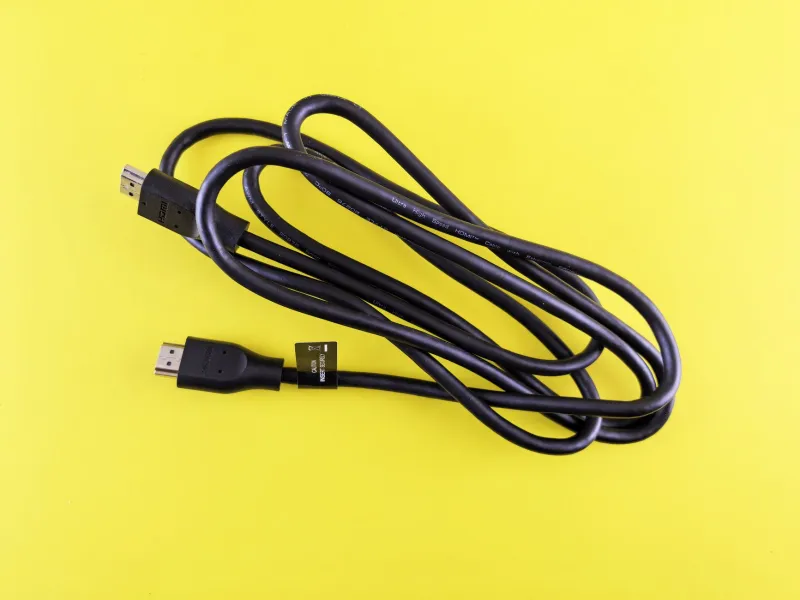
Among the many decisions a projector buyer makes, cable selection rarely receives serious attention. Specifications dominate the conversation — native resolution, contrast ratio, lumen output. The humble HDMI cable, coiled in a retail bin or tucked into a projector box as an afterthought, is seldom treated as a performance component in its own right. That oversight is costly.
The reality is straightforward but frequently ignored: a projector can only display what its input receives. If the signal arriving at the HDMI port is degraded, compressed, or throttled by an inadequate cable, no amount of internal processing will recover the lost data. The gap between a projector's certified capability and its actual output often begins not inside the unit itself, but at the point where the cable meets the source device.
Understanding Bandwidth: The Number Behind the Number
HDMI is not a single standard. It has evolved through several versions — 1.4, 2.0, and 2.1 — each carrying meaningfully different bandwidth ceilings. This distinction matters enormously when 4K content is involved.
HDMI 1.4, still found in many older cables and devices, supports a maximum bandwidth of approximately 10.2 Gbps. That ceiling is sufficient for 4K resolution at 30 frames per second, but it cannot accommodate 4K at 60Hz — a frame rate increasingly standard in modern streaming and gaming sources. HDMI 2.0 raises the ceiling to 18 Gbps, enabling 4K at 60Hz with High Dynamic Range. HDMI 2.1 extends further still, reaching 48 Gbps for 8K and high-refresh 4K applications.
The problem is that cables are not always labeled clearly, and retail packaging is often misleading. A cable marketed as "4K compatible" may technically pass a 4K signal at 30Hz while failing entirely at 60Hz with HDR enabled. Buyers who do not verify the HDMI version of their cable — not merely the claim on the packaging — are frequently operating below their projector's actual capability without realizing it.
HDCP Handshake Failures and Why They Happen
High-Bandwidth Digital Content Protection, known as HDCP, is the copy-protection protocol embedded in the HDMI ecosystem. When a source device — a 4K Blu-ray player, a streaming stick, a gaming console — initiates a connection, it exchanges an HDCP handshake with the display device. Both ends must support compatible HDCP versions for the full-resolution signal to pass through.
4K content from commercial sources typically requires HDCP 2.2 compliance. If any component in the signal chain — the cable, an HDMI switch, a receiver, or the projector's input port — does not support HDCP 2.2, the system defaults to a lower resolution or, in some cases, refuses to display the content entirely. Users in this situation often assume their projector is malfunctioning when the actual failure point is a non-compliant cable or intermediary device.
This is not a theoretical edge case. It is one of the most common support issues encountered by projector owners who have invested in capable hardware but assembled their connectivity chain without verifying HDCP compliance at each link. Checking the HDCP version supported by every component — source, cable, any switching hardware, and the projector — before installation eliminates this failure mode entirely.
Distance and Signal Integrity: The Physics of Long Runs
In home theater and business installation environments, source devices are frequently located at a distance from the projector. A ceiling-mounted projector in a conference room or a dedicated home theater may require cable runs of 15, 25, or even 50 feet. At these lengths, passive HDMI cables — the standard variety found in most electronics stores — begin to exhibit measurable signal degradation.
HDMI signals are electrical. Over longer cable runs, resistance and capacitance within the cable's conductors attenuate the signal. The higher the bandwidth being transmitted, the more vulnerable it is to this attenuation. A passive cable that performs acceptably at 10 feet may produce intermittent dropouts, color artifacts, or complete signal loss at 25 feet when carrying a 4K HDR signal.
For runs exceeding approximately 15 to 20 feet, several solutions exist. Active HDMI cables incorporate signal-boosting electronics within the cable itself, extending reliable transmission to 30 or 40 feet. Fiber optic HDMI cables eliminate electrical attenuation entirely, supporting very long runs — sometimes exceeding 100 feet — without signal degradation. HDMI over HDBaseT extenders, which transmit the signal over Cat6 Ethernet cabling, are a preferred solution in commercial installations where cable routing through walls or ceilings makes direct HDMI runs impractical.
Each of these solutions carries a higher cost than a standard passive cable, but that cost is modest relative to the projector investment it protects.
The Switch and Splitter Problem
Many users introduce HDMI switches or matrix switchers into their setup to manage multiple source devices from a single projector input. This is a reasonable convenience, but it introduces additional compliance variables. An HDMI switch that does not support HDMI 2.0 or HDCP 2.2 will act as a bottleneck regardless of the cable and projector specifications surrounding it. The entire signal chain performs at the level of its weakest component.
The same principle applies to HDMI splitters used in multi-display environments. Any device inserted between the source and the projector must be verified for version compliance, not merely assumed to pass the signal transparently.
When assembling a projection system, treating the signal chain as a unified infrastructure — rather than a collection of independent parts — is the discipline that separates a properly functioning 4K setup from one that perpetually underdelivers.
Practical Steps Before Your Next Installation
A few targeted verification steps eliminate most cable-related performance problems before they occur.
First, identify the HDMI version of every component in the chain: the source device's output, the cable, any intermediate switching hardware, and the projector's input. All must support HDMI 2.0 at minimum for 4K at 60Hz; HDCP 2.2 compliance is non-negotiable for protected commercial content.
Second, measure the actual cable run distance before purchasing. For anything beyond 15 feet, budget for an active or fiber optic solution rather than assuming a standard cable will suffice.
Third, purchase cables from manufacturers who provide clear, verifiable specifications — not just marketing claims. Certifications from the HDMI Licensing Administrator (HDMI LA) provide an objective benchmark. Look for cables certified as "Premium High Speed" for HDMI 2.0 applications or "Ultra High Speed" for HDMI 2.1.
Finally, if a 4K signal is not displaying correctly after installation, test the cable in isolation before assuming the projector or source device is at fault. Substituting a known-compliant cable is the fastest way to identify whether the infrastructure — rather than the hardware — is the point of failure.
Projector Performance Begins at the Port
Sanyo LCD projectors are engineered to deliver precise, high-resolution imagery in demanding business and home theater environments. That engineering investment is fully realized only when the signal arriving at the projector's input is complete, uncompressed, and compliant. The cable connecting source to display is not a peripheral accessory — it is the first link in the performance chain.
Buyers who allocate serious attention to resolution and lamp output but treat cabling as an afterthought are, in effect, placing a ceiling on their projector's performance before it ever powers on. Removing that ceiling requires nothing more than informed cable selection and a systematic approach to signal chain verification. The clarity every pixel is capable of delivering depends on it.